Kubernetes-05-Pod基本操作

查看 Pod

K8s 给 Pod 设计了逻辑隔离,就是命名空间 namespace,默认是 default(创建时不指定) 和 kube-system(k8s集群自身的)

1
2
3
4
5
6
7
8
9
10
11
12
13
14
15
16
17
18
19
20
21
22
23
24
25
26
27
28
29
30
31
32
33
34
35
36
37
38
39
40
41
42
43
44
45
46
47
48
49
50
51
52
53
54
55
56
57
58
59
60
61
62
63
64
65
66
67
68
69
70
71
72
73
74
75
76
77
# 查看默认命名空间的 pod
$ kubectl get pods|pod|po
No resources found in default namespace.
# 等价于
$ kubectl get pods|pod|po -n default
No resources found in default namespace.

# 查看系统命名空间的 pod
$ kubectl get pods|pod|po -n kube-system
NAME READY STATUS RESTARTS AGE
coredns-66f779496c-q79xm 1/1 Running 1 (69s ago) 26h
coredns-66f779496c-qcs8b 1/1 Running 1 (69s ago) 26h
etcd-k8s-node1 1/1 Running 1 (72s ago) 26h
kube-apiserver-k8s-node1 1/1 Running 1 (72s ago) 26h
kube-controller-manager-k8s-node1 1/1 Running 1 (72s ago) 26h
kube-proxy-56wjm 1/1 Running 1 (72s ago) 26h
kube-proxy-t85dn 1/1 Running 1 (69s ago) 26h
kube-proxy-xtp7h 1/1 Running 1 (97s ago) 26h
kube-scheduler-k8s-node1 1/1 Running 1 (72s ago) 26h

# 查看所有命名空间的 pod
$ kubectl get pods|pod|po -A
NAMESPACE NAME READY STATUS RESTARTS AGE
kube-flannel kube-flannel-ds-ltxk5 1/1 Running 1 (87s ago) 25h
kube-flannel kube-flannel-ds-r7fl4 1/1 Running 1 (85s ago) 25h
kube-flannel kube-flannel-ds-sb4xl 1/1 Running 2 (51s ago) 25h
kube-system coredns-66f779496c-q79xm 1/1 Running 1 (85s ago) 26h
kube-system coredns-66f779496c-qcs8b 1/1 Running 1 (85s ago) 26h
kube-system etcd-k8s-node1 1/1 Running 1 (88s ago) 26h
kube-system kube-apiserver-k8s-node1 1/1 Running 1 (88s ago) 26h
kube-system kube-controller-manager-k8s-node1 1/1 Running 1 (88s ago) 26h
kube-system kube-proxy-56wjm 1/1 Running 1 (88s ago) 26h
kube-system kube-proxy-t85dn 1/1 Running 1 (85s ago) 26h
kube-system kube-proxy-xtp7h 1/1 Running 1 (113s ago) 26h
kube-system kube-scheduler-k8s-node1 1/1 Running 1 (88s ago) 26h

# 查看默认命名空间下 pod 的详细信息
$ kubectl get pods|pod|po -o wide
No resources found in default namespace.

# 查看指定命名空间下 pod 的详细信息
$ kubectl get pods|pod|po -o wide -n kube-system
NAME READY STATUS RESTARTS AGE IP NODE NOMINATED NODE READINESS GATES
coredns-66f779496c-q79xm 1/1 Running 1 (107s ago) 26h 10.244.2.4 k8s-node3 <none> <none>
coredns-66f779496c-qcs8b 1/1 Running 1 (107s ago) 26h 10.244.2.5 k8s-node3 <none> <none>
etcd-k8s-node1 1/1 Running 1 (110s ago) 26h 10.15.0.21 k8s-node1 <none> <none>
kube-apiserver-k8s-node1 1/1 Running 1 (110s ago) 26h 10.15.0.21 k8s-node1 <none> <none>
kube-controller-manager-k8s-node1 1/1 Running 1 (110s ago) 26h 10.15.0.21 k8s-node1 <none> <none>
kube-proxy-56wjm 1/1 Running 1 (110s ago) 26h 10.15.0.21 k8s-node1 <none> <none>
kube-proxy-t85dn 1/1 Running 1 (107s ago) 26h 10.15.0.23 k8s-node3 <none> <none>
kube-proxy-xtp7h 1/1 Running 1 (2m15s ago) 26h 10.15.0.22 k8s-node2 <none> <none>
kube-scheduler-k8s-node1 1/1 Running 1 (110s ago) 26h 10.15.0.21 k8s-node1 <none> <none>

# 查看所有命名空间下 pod 的详细信息
$ kubectl get pods|pod|po -o wide -A
NAMESPACE NAME READY STATUS RESTARTS AGE IP NODE NOMINATED NODE READINESS GATES
kube-flannel kube-flannel-ds-ltxk5 1/1 Running 1 (2m10s ago) 25h 10.15.0.21 k8s-node1 <none> <none>
kube-flannel kube-flannel-ds-r7fl4 1/1 Running 1 (2m8s ago) 25h 10.15.0.23 k8s-node3 <none> <none>
kube-flannel kube-flannel-ds-sb4xl 1/1 Running 2 (94s ago) 25h 10.15.0.22 k8s-node2 <none> <none>
kube-system coredns-66f779496c-q79xm 1/1 Running 1 (2m8s ago) 26h 10.244.2.4 k8s-node3 <none> <none>
kube-system coredns-66f779496c-qcs8b 1/1 Running 1 (2m8s ago) 26h 10.244.2.5 k8s-node3 <none> <none>
kube-system etcd-k8s-node1 1/1 Running 1 (2m11s ago) 26h 10.15.0.21 k8s-node1 <none> <none>
kube-system kube-apiserver-k8s-node1 1/1 Running 1 (2m11s ago) 26h 10.15.0.21 k8s-node1 <none> <none>
kube-system kube-controller-manager-k8s-node1 1/1 Running 1 (2m11s ago) 26h 10.15.0.21 k8s-node1 <none> <none>
kube-system kube-proxy-56wjm 1/1 Running 1 (2m11s ago) 26h 10.15.0.21 k8s-node1 <none> <none>
kube-system kube-proxy-t85dn 1/1 Running 1 (2m8s ago) 26h 10.15.0.23 k8s-node3 <none> <none>
kube-system kube-proxy-xtp7h 1/1 Running 1 (2m36s ago) 26h 10.15.0.22 k8s-node2 <none> <none>
kube-system kube-scheduler-k8s-node1 1/1 Running 1 (2m11s ago) 26h 10.15.0.21 k8s-node1 <none> <none>

# 实时监控 pod 的状态
$ kubectl get pod -w
$ kubectl get pod -w -n 命名空间名称
$ kubectl get pod -A -w

# 查看 pod 详情
$ kubectl describe pod pod名称

创建 Pod

命令创建

与 Docker 创建类似,有 run --port='' --privileged=false --restart=false --i --t 等 ,可以通过 kubectl run --help获取帮助。

1
2
3
4
5
6
7
8
9
10
11
12
13
14
15
16
17
18
19
20
21
22
23
24
25
26
27
28
29
30
31
32
33
34
35
36
37
38
39
40
41
42
43
44
45
46
47
48
49
50
51
52
53
54
55
56
57
58
59
60
61
# kubectl run pod名称 --image=镜像标签,默认创建在 default 命名空间下
$ kubectl run nginx --image=nginx:1.19
pod/nginx created
$ kubectl get pods
NAME READY STATUS RESTARTS AGE
nginx 0/1 ContainerCreating 0 16s
$ kubectl get pods -o wide
NAME READY STATUS RESTARTS AGE IP NODE NOMINATED NODE READINESS GATES
nginx 1/1 Running 0 117s 10.244.1.4 k8s-node2 <none> <none>
$ kubectl describe pods nginx
Name: nginx
Namespace: default
Priority: 0
Service Account: default
Node: k8s-node2/10.15.0.22
Start Time: Mon, 12 Jan 2026 23:27:44 +0800
Labels: run=nginx
Annotations: <none>
Status: Running
IP: 10.244.1.4
IPs:
IP: 10.244.1.4
Containers:
nginx:
Container ID: containerd://48157f84cb920e15940dbced403219bc6c41b1b495803fcff38794a32268896d
Image: nginx:1.19
Image ID: docker.io/library/nginx@sha256:df13abe416e37eb3db4722840dd479b00ba193ac6606e7902331dcea50f4f1f2
Port: <none>
Host Port: <none>
State: Running
Started: Mon, 12 Jan 2026 23:28:49 +0800
Ready: True
Restart Count: 0
Environment: <none>
Mounts:
/var/run/secrets/kubernetes.io/serviceaccount from kube-api-access-2fmdh (ro)
Conditions:
Type Status
Initialized True
Ready True
ContainersReady True
PodScheduled True
Volumes:
kube-api-access-2fmdh:
Type: Projected (a volume that contains injected data from multiple sources)
TokenExpirationSeconds: 3607
ConfigMapName: kube-root-ca.crt
ConfigMapOptional: <nil>
DownwardAPI: true
QoS Class: BestEffort
Node-Selectors: <none>
Tolerations: node.kubernetes.io/not-ready:NoExecute op=Exists for 300s
node.kubernetes.io/unreachable:NoExecute op=Exists for 300s
Events:
Type Reason Age From Message
---- ------ ---- ---- -------
Normal Scheduled 69s default-scheduler Successfully assigned default/nginx to k8s-node2
Normal Pulling 68s kubelet Pulling image "nginx:1.19"
Normal Pulled 4s kubelet Successfully pulled image "nginx:1.19" in 1m3.996s (1m3.996s including waiting)
Normal Created 4s kubelet Created container nginx
Normal Started 4s kubelet Started container nginx

通过 yml 创建

官网参考地址: https://kubernetes.io/zh-cn/docs/reference/kubernetes-api/workload-resources/pod-v1/

cat nginx-pod.yml

nginx-pod.yml
1
2
3
4
5
6
7
8
9
10
11
12
13
14
# 代表使用的 api 版本
apiVersion: v1
# 代表创建的类型
kind: Pod
# 用来书写对应元数据信息,比如指定 Pod 名称以及 namespace 命名空间,也可以自定义名字
metadata:
name: nginx
# 对 Pod 预期行为的规约,比如配置容器
spec:
containers:
- name: nginx
image: nginx:1.19
ports:
- containerPort: 80

使用 kubectl create/apply -f 创建 pod

区别

create 仅仅是不存在时创建,如果已经存在则报错!

apply 不存在创建,存在更新配置。推荐使用 apply!`

1
2
3
4
5
6
7
8
9
10
11
12
13
14
15
$ kubectl create -f nginx-pod.yml 
pod/nginx created
$ kubectl get pods
NAME READY STATUS RESTARTS AGE
nginx 1/1 Running 0 9s
$ kubectl create -f nginx-pod.yml
Error from server (AlreadyExists): error when creating "nginx-pod.yml": pods "nginx" already exists

$ kubectl apply -f nginx-pod.yml
pod/nginx created
$ kubectl get pods
NAME READY STATUS RESTARTS AGE
nginx 1/1 Running 0 6s
$ kubectl apply -f nginx-pod.yml
pod/nginx unchanged

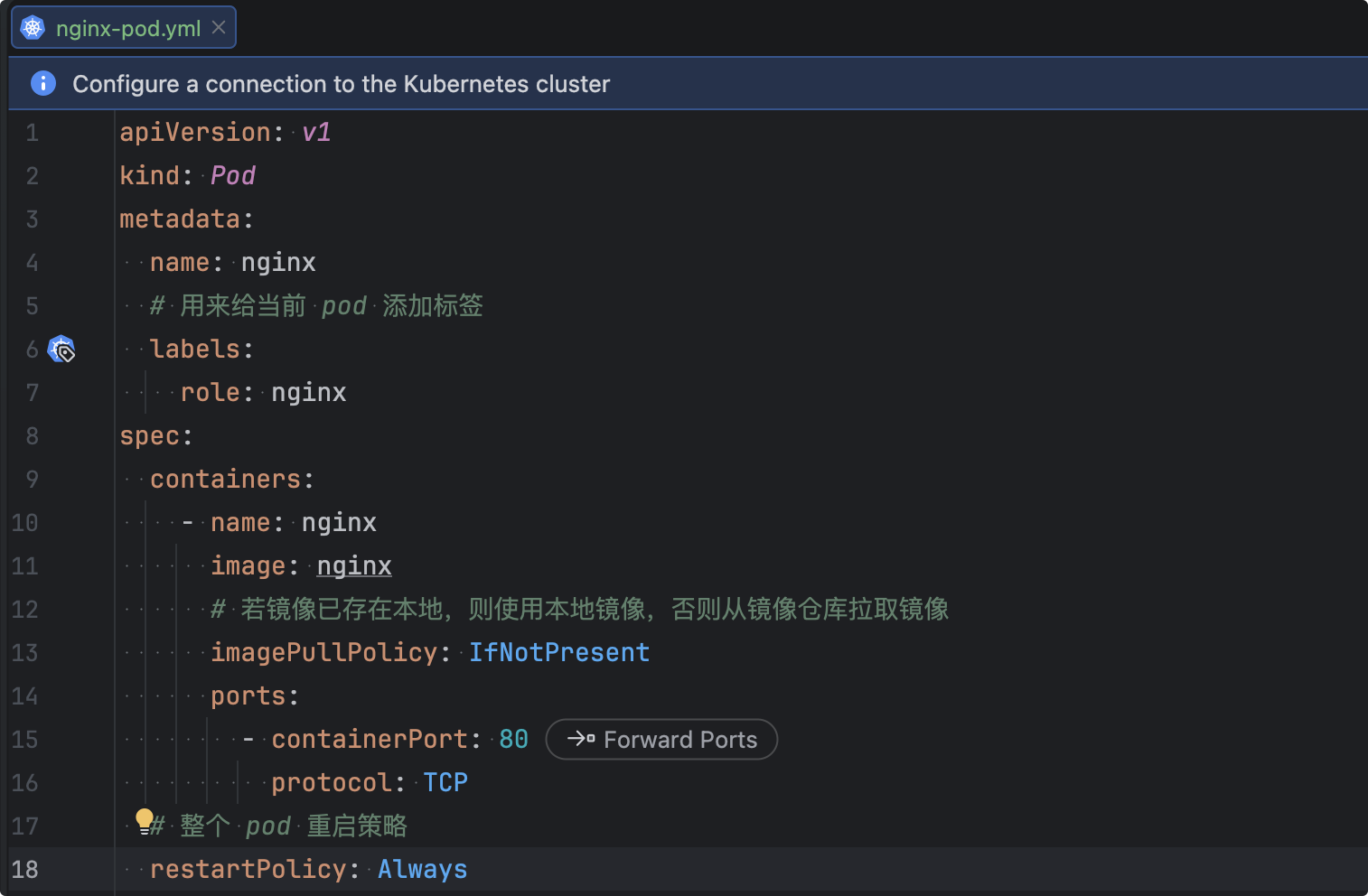
通过IDEA插件生成Pod模板

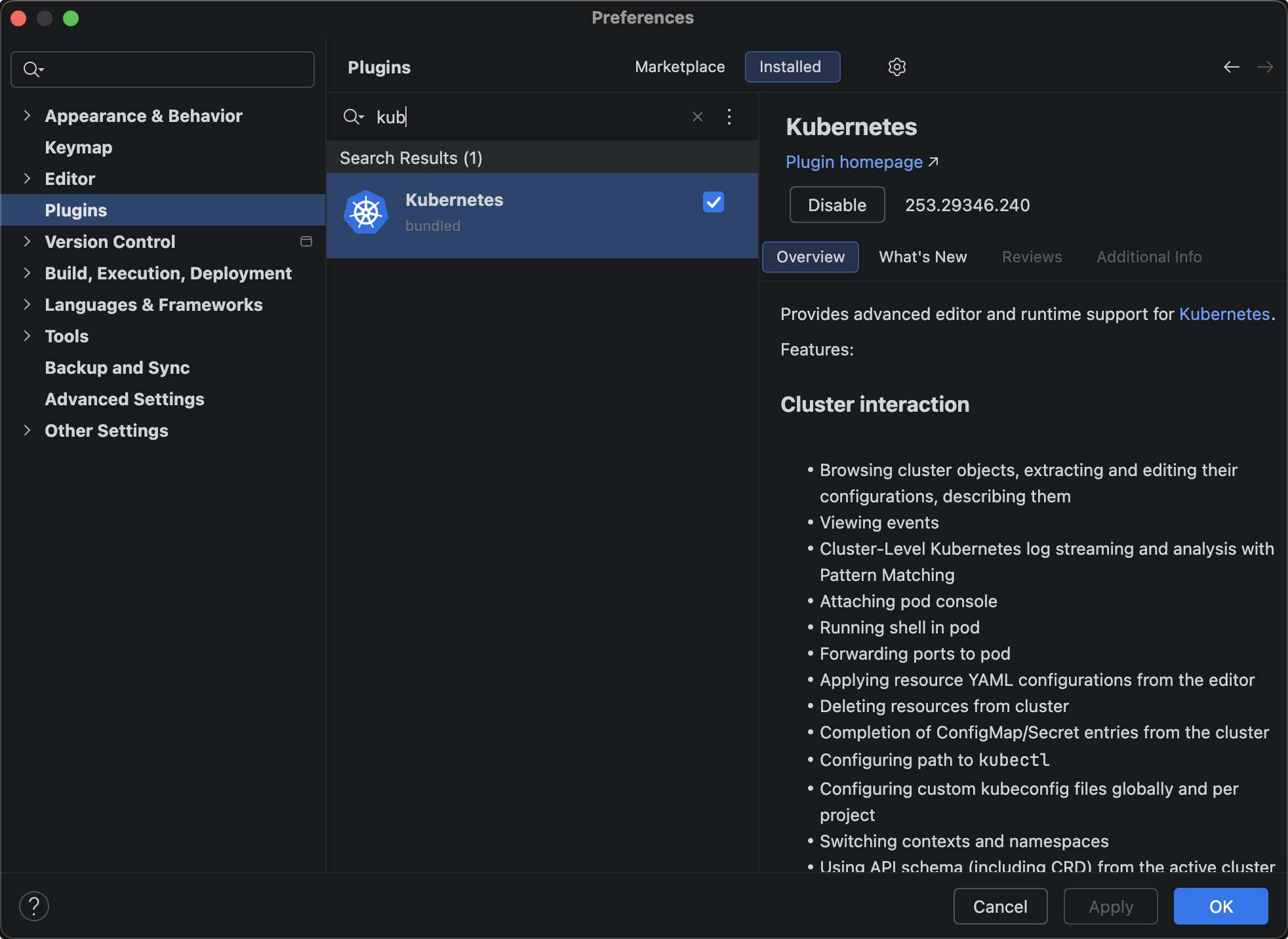
Idea 安装插件:

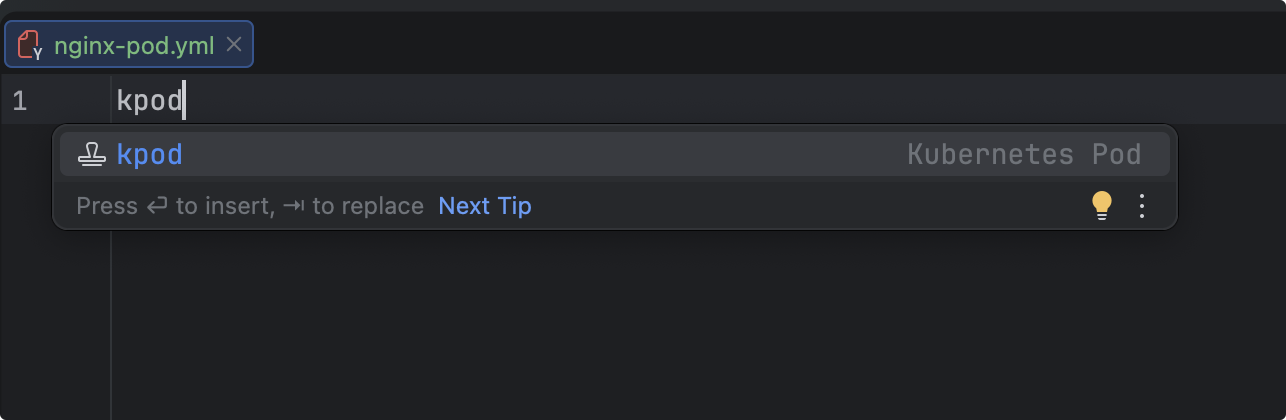
打开 Idea 创建文件 nginx-pod.yml,输入小写 kpod即可

nginx-pod.yml
1
2
3
4
5
6
7
8
9
10
11
12
13
14
15
16
17
18
apiVersion: v1
kind: Pod
metadata:
name: nginx
# 用来给当前 pod 添加标签
labels:
role: nginx
spec:
containers:
- name: nginx
image: nginx
# 若镜像已存在本地,则使用本地镜像,否则从镜像仓库拉取镜像
imagePullPolicy: IfNotPresent
ports:
- containerPort: 80
protocol: TCP
# 整个 pod 重启策略
restartPolicy: Always

删除 Pod

1
2
3
4
5
6
7
8
9
10
11
12
13
14
# 直接根据 pod 名称 删除
$ kubectl delete pod nginx
pod "nginx" deleted
# 根据 yml 文件删除
$ kubectl delete -f nginx-pod.yml
pod "nginx" deleted

# 强制删除 pod
# --grace-period 优雅终止期 默认30秒
# --grace-period=0立即强制删除,不等待优雅终止(常用)
$ kubectl delete pod nginx --force --grace-period=0
$ kubectl delete pod myapp-label --force
# 等价于:
$ kubectl delete pod myapp-label --grace-period=30 --force

进入 Pod 中容器

1
2
3
4
# 这种方式进入容器默认只会进入 pod 中第一个容器
$ kubectl exec -it nginx(pod名称) --(固定写死) bash(执行命令)
# 进入指定 pod 中的容器
$ kubectl exec -it nginx(pod名称) -c nignx(容器名称) --(固定写死) bash(执行命令)

查看 Pod 日志

1
2
3
4
# 这种方式默认查看 pod 中第一个容器日志
$ kubectl logs -f(可选,实时) nginx(pod名称)
# 查看 pod 指定容器的日志
$ kubectl logs -f(可选,实时) nginx(pod名称) -c nginx(容器名称)

查看 Pod 描述信息

1
$ kubectl describe pod nignx(pod名称)

Pod 运行多个容器

创建 pod

myapp-pod.yml
1
2
3
4
5
6
7
8
9
10
11
12
13
14
15
16
17
18
19
20
21
22
23
apiVersion: v1
kind: Pod
metadata:
name: myapp-pod
labels:
role: myapp-pod
spec:
containers:
- name: nginx
image: nginx:1.19
imagePullPolicy: IfNotPresent
ports:
- containerPort: 80
protocol: TCP

- name: redis
image: redis:5.0.10
ports:
- containerPort: 6379
protocol: TCP
imagePullPolicy: IfNotPresent

restartPolicy: Always

启动 pod

1
2
3
4
5
6
7
8
9
10
11
12
13
14
15
16
17
18
19
20
21
22
23
24
25
26
27
28
29
30
31
32
33
34
35
36
37
38
39
40
41
42
43
44
45
46
47
48
49
50
51
52
53
54
55
56
57
58
59
60
61
62
63
64
65
66
67
68
69
70
71
72
73
$ kubectl apply -f 002-myapp-pod.yml 
pod/myapp-pod created
$ kubectl get pod
NAME READY STATUS RESTARTS AGE
myapp-pod 2/2 Running 0 3m4s
$ kubectl describe pod myapp-pod
Name: myapp-pod
Namespace: default
Priority: 0
Service Account: default
Node: k8s-node2/10.15.0.22
Start Time: Tue, 20 Jan 2026 21:39:22 +0800
Labels: role=myapp-pod
Annotations: <none>
Status: Running
IP: 10.244.1.8
IPs:
IP: 10.244.1.8
Containers:
nginx:
Container ID: containerd://47db8b7aac0ffc2bb3ffae23c125fc431b0fab68ca4b8f7caa7766ada22ea8b3
Image: nginx:1.19
Image ID: docker.io/library/nginx@sha256:df13abe416e37eb3db4722840dd479b00ba193ac6606e7902331dcea50f4f1f2
Port: 80/TCP
Host Port: 0/TCP
State: Running
Started: Tue, 20 Jan 2026 21:39:23 +0800
Ready: True
Restart Count: 0
Environment: <none>
Mounts:
/var/run/secrets/kubernetes.io/serviceaccount from kube-api-access-rr45d (ro)
redis:
Container ID: containerd://2a340a45fdc3833057dddb24e1e0a0f595efa596c17042b0fdf1106d14943098
Image: redis:5.0.10
Image ID: docker.io/library/redis@sha256:2236b827820ab65836a7aa5b494e03c3ede6e8801a853a0e24c9d6afbcfe0461
Port: 6379/TCP
Host Port: 0/TCP
State: Running
Started: Tue, 20 Jan 2026 21:40:23 +0800
Ready: True
Restart Count: 0
Environment: <none>
Mounts:
/var/run/secrets/kubernetes.io/serviceaccount from kube-api-access-rr45d (ro)
Conditions:
Type Status
Initialized True
Ready True
ContainersReady True
PodScheduled True
Volumes:
kube-api-access-rr45d:
Type: Projected (a volume that contains injected data from multiple sources)
TokenExpirationSeconds: 3607
ConfigMapName: kube-root-ca.crt
ConfigMapOptional: <nil>
DownwardAPI: true
QoS Class: BestEffort
Node-Selectors: <none>
Tolerations: node.kubernetes.io/not-ready:NoExecute op=Exists for 300s
node.kubernetes.io/unreachable:NoExecute op=Exists for 300s
Events:
Type Reason Age From Message
---- ------ ---- ---- -------
Normal Scheduled 5m20s default-scheduler Successfully assigned default/myapp-pod to k8s-node2
Normal Pulled 5m19s kubelet Container image "nginx:1.19" already present on machine
Normal Created 5m19s kubelet Created container nginx
Normal Started 5m19s kubelet Started container nginx
Normal Pulling 5m19s kubelet Pulling image "redis:5.0.10"
Normal Pulled 4m19s kubelet Successfully pulled image "redis:5.0.10" in 59.698s (59.698s including waiting)
Normal Created 4m19s kubelet Created container redis
Normal Started 4m19s kubelet Started container redis

查看容器日志

1
2
3
4
5
6
7
8
9
10
11
12
13
14
15
16
17
18
19
20
21
22
23
24
25
26
27
28
29
30
31
# 查看日志 (默认只查看第一个容器日志,这里是展示 nginx 日志)
$ kubectl logs -f myapp-pod
Defaulted container "nginx" out of: nginx, redis
/docker-entrypoint.sh: /docker-entrypoint.d/ is not empty, will attempt to perform configuration
/docker-entrypoint.sh: Looking for shell scripts in /docker-entrypoint.d/
/docker-entrypoint.sh: Launching /docker-entrypoint.d/10-listen-on-ipv6-by-default.sh
10-listen-on-ipv6-by-default.sh: info: Getting the checksum of /etc/nginx/conf.d/default.conf
10-listen-on-ipv6-by-default.sh: info: Enabled listen on IPv6 in /etc/nginx/conf.d/default.conf
/docker-entrypoint.sh: Launching /docker-entrypoint.d/20-envsubst-on-templates.sh
/docker-entrypoint.sh: Launching /docker-entrypoint.d/30-tune-worker-processes.sh
/docker-entrypoint.sh: Configuration complete; ready for start up

# 查看 pod 中指定容器的日志
$ kubectl logs -f myapp-pod -c nginx(容器名称)
/docker-entrypoint.sh: /docker-entrypoint.d/ is not empty, will attempt to perform configuration
/docker-entrypoint.sh: Looking for shell scripts in /docker-entrypoint.d/
/docker-entrypoint.sh: Launching /docker-entrypoint.d/10-listen-on-ipv6-by-default.sh
10-listen-on-ipv6-by-default.sh: info: Getting the checksum of /etc/nginx/conf.d/default.conf
10-listen-on-ipv6-by-default.sh: info: Enabled listen on IPv6 in /etc/nginx/conf.d/default.conf
/docker-entrypoint.sh: Launching /docker-entrypoint.d/20-envsubst-on-templates.sh
/docker-entrypoint.sh: Launching /docker-entrypoint.d/30-tune-worker-processes.sh
/docker-entrypoint.sh: Configuration complete; ready for start up
$ kubectl logs -f myapp-pod -c redis(容器名称)
1:C 20 Jan 2026 13:40:23.358 # oO0OoO0OoO0Oo Redis is starting oO0OoO0OoO0Oo
1:C 20 Jan 2026 13:40:23.358 # Redis version=5.0.10, bits=64, commit=00000000, modified=0, pid=1, just started
1:C 20 Jan 2026 13:40:23.358 # Warning: no config file specified, using the default config. In order to specify a config file use redis-server /path/to/redis.conf
1:M 20 Jan 2026 13:40:23.360 * Running mode=standalone, port=6379.
1:M 20 Jan 2026 13:40:23.360 # WARNING: The TCP backlog setting of 511 cannot be enforced because /proc/sys/net/core/somaxconn is set to the lower value of 128.
1:M 20 Jan 2026 13:40:23.360 # Server initialized
1:M 20 Jan 2026 13:40:23.360 # WARNING you have Transparent Huge Pages (THP) support enabled in your kernel. This will create latency and memory usage issues with Redis. To fix this issue run the command 'echo never > /sys/kernel/mm/transparent_hugepage/enabled' as root, and add it to your /etc/rc.local in order to retain the setting after a reboot. Redis must be restarted after THP is disabled.
1:M 20 Jan 2026 13:40:23.365 * Ready to accept connections
进入容器

1
2
3
4
5
6
7
8
9
10
11
# 进入 pod 的容器 (默认进入第一个容器内部,这里会进入 nginx 容器内部)
$ kubectl exec -it myapp-pod -- bash
Defaulted container "nginx" out of: nginx, redis
root@myapp-pod:/# exit
exit

# 进入 pod 中指定容器内部
$ kubectl exec -it myapp-pod -c nginx -- bash
root@myapp-pod:/#
$ kubectl exec -it myapp-pod -c redis -- bash
root@myapp-pod:/data#
作者

bufx

发布于

2026-01-12

更新于

2026-01-21

许可协议